




How Can a Health System Stop Relying on Imaging CDs?
Replace disc intake with electronic exchange that runs on top of the EHR, RIS, and PACS you already use. Medicom Connect links facilities over encrypted peer-to-peer connections, delivers outside studies into the EHR, and lets patients upload priors before appointments. Onsite Women's Health grew image transfer volume 13x after moving from eight exchange platforms to one.
Share


Table of contents
Outside priors arrive on CDs, through separate portals, or not at all. Staff spend hours tracking them down, clinicians wait, and the delay adds cost and risk to every handoff. Ending the disc means giving every facility in your network one electronic path for imaging that works with the systems you already run.
Why Are Imaging CDs Still a Problem?
Physical media and one-off portals keep imaging exchange manual. A CD has to be carried in, logged at the front desk, imported, and matched to the right patient before anyone can read it. Each separate portal adds another login and another place to look. Those manual steps frustrate teams, drive up operating costs, and delay care.
Do You Have to Replace Your PACS or EHR to Go Disc-Free?
No. Medicom Connect sits on top of your existing EHR, RIS, and PACS and coordinates data flow over standard connection paths. It runs on ImageX, Medicom's exchange infrastructure, which sets up encrypted, peer-to-peer connections between facilities and delivers critical studies directly into the EHR. Your teams keep the systems they already trust.
What Should an Imaging Exchange Network Do Beyond Moving Files?
Plenty of vendors can move an image from point A to point B. A network built to replace the disc should also:
- Retrieve Across the Whole Network: As a vendor-agnostic exchange broker, Medicom runs a federated network, so you can pull relevant imaging from outside your own organization. The more the network grows, the more complete the picture at the point of care.
- Protect Data in Motion: Imaging moves with enterprise-grade encryption between facilities, vendors, and patients, so security comes built in.
- Show Every Exchange: Analytics confirm when studies are sent and received, surface patterns in exchange volume, and help teams prioritize urgent cases.
How Does Outside Imaging Get Into the Patient Chart?
For organizations with a SMART on FHIR capable EHR, Connect embeds imaging workflows directly in the patient record. From the active chart, users can reconcile studies, match patients, and import, upload, share, or append outside exams without a separate login.
Incoming data isn't always clean, so Checkpoint gives staff a reconciliation worklist. They review unmatched files, confirm patient identities, and link studies to open EHR orders. Checkpoint is integrated into Epic through SMART on FHIR, so data exceptions don't turn into care delays.
What Can Run Automatically Once Discs Are Gone?
With exchange running electronically, clinical automation can handle steps staff used to do by hand. AI-powered prior retrieval, automated order generation, and patient matching run in the background, triggered by your RIS or EHR. Electronic exchange also keeps full clinical context attached to every image.
How Do Patients Share Imaging Without a CD?
Patient access tools put patients in charge of their own imaging and take disc intake off the front desk:
- Upload: Patients securely upload outside imaging before an appointment, so no one has to take in a CD at check-in.
- Patient Share (Coming Soon): Patients will be able to view, download, and share diagnostic studies and structured reports from the patient portal or through secure, password-protected links.
What Do Patients, Providers, and the Enterprise Gain?
- Patients: Priors can be in place before the patient walks in, without a trip to pick up a disc or a wait while it's imported.
- Providers: Outside studies show up in the chart with full clinical context, so clinicians stop hunting through portals and discs and spend that time on care.
- Enterprise: One network replaces CDs, separate portals, and multiple exchange vendors. Staff spend fewer hours chasing data, and analytics show exactly what moved and when.
How Big Is the Medicom Connect Network?
The Medicom Connect network covers all 50 states, with partnerships that include the Veterans Administration and Indian Health Service. It comes in three subscription levels:
- Connect Free: Basic peer-to-peer exchange sponsored by a network partner, built to establish foundational connectivity.
- Connect Advanced: The standard offering for comprehensive data exchange.
- Connect Premium: Builds on Advanced with enhanced workflows for enterprise-wide automation and integration.
What Results Have Organizations Seen?
Onsite Women's Health, with more than 150 centers in 26 states, grew image transfer volume 13x between 2023 and 2025 while moving from eight separate exchange platforms to one. CEO Jillian Wright said, "The Medicom solution was transformative because it simplified our internal workflows while managing the complexity of a large external network. It allowed us to re-engineer our image sharing model to scale with growth and stay focused on delivering the best patient care."
Free connection assistance gets facilities live fast, so you can start exchanging studies in days. Book a demo to see how to get priors in place before the patient walks through the door.
Frequently Asked Questions
Why do hospitals still use CDs for medical imaging?
Many organizations still lack a single electronic path to every facility they work with, so outside imaging arrives on discs or through separate portals. Each one adds manual intake, import, and patient matching.
Do I need to replace my PACS to stop using CDs?
No. Medicom Connect sits on top of your existing EHR, RIS, and PACS and coordinates data flow over standard connection paths.
How do outside images get into Epic without a CD?
Through SMART on FHIR, Connect works inside the patient chart, and Checkpoint gives staff a worklist to confirm identities and link outside studies to open EHR orders.
Can patients upload their own imaging before an appointment?
Yes. Medicom's Upload tool lets patients securely send outside imaging ahead of a visit, so the front desk doesn't have to take in a CD.
Is there a free way to join the Medicom Connect network?
Yes. Connect Free provides basic peer-to-peer exchange sponsored by a network partner, and free connection assistance helps facilities go live in days.
More Answers
Answers
How Inconsistent Are Imaging Procedure Names Across Health Systems?
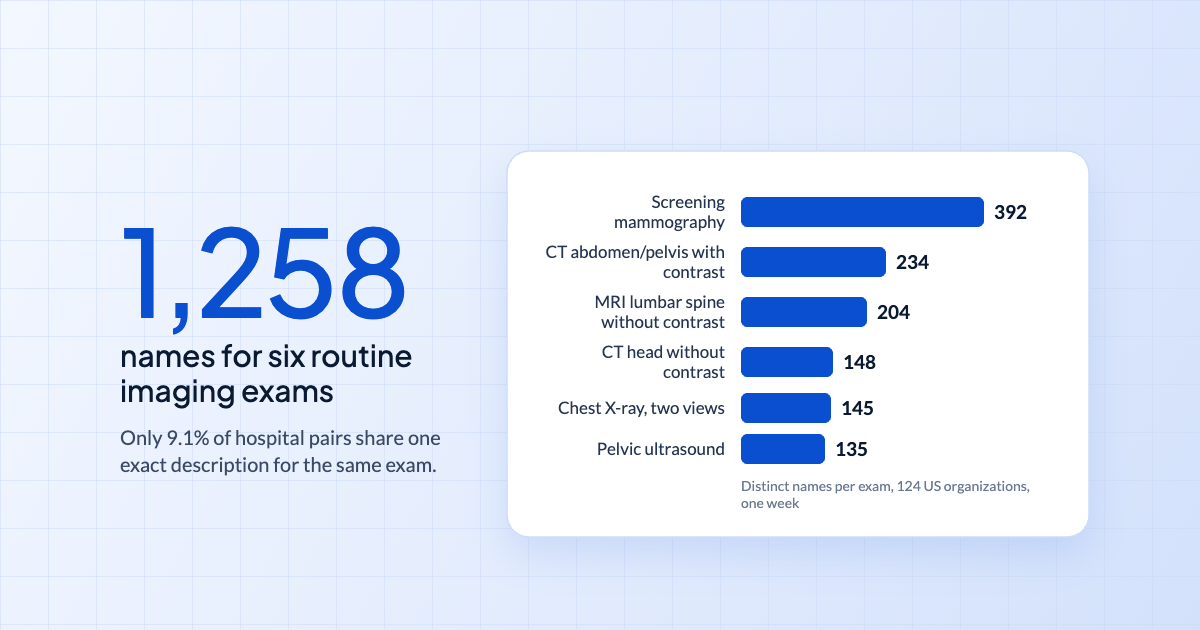
Very. In a Medicom study of 124 US healthcare organizations, six routine exams appeared under 1,258 distinct descriptions, and only 9.1% of organization pairs shared even one exact description for the same exam. More than 1 in 4 sided exams left out laterality, and contrast phase showed up in 10 different notations.

Answers
How Does Faster Access to Prior Imaging Change ED Outcomes?
In a JAMIA study, every hour cut from the time it took to access outside patient information was associated with a 52.9-minute shorter ED stay, fewer CT, MRI, and X-ray orders, a 2.4-point drop in admissions, and $1,187 lower charges per visit. Prior imaging is where that access is slowest.
Answers
How Do You Get Outside Imaging Into the EHR Without a Manual Order?
Outside imaging can't attach to the EHR without a matching order and accession number, so it often sits unseen in the archive. Medicom's Auto Order Generation reads the study's DICOM metadata and sends an HL7 order or result automatically, so outside studies show up in the chart just like exams performed on site.
Your Plan for Enterprise Imaging Interoperability
Talk to one of our experts to plan your interoperability strategy, explore workflows, or get a personalized demo. We’re here to help.
